Which WordPress Sites Should Not Move to EmDash
Stores, member areas, sites built around one plugin, and a few more cases where WordPress is still the better home, plus a three-question test for your own site.
On this page
- Sites that take payment for products
- Sites with member logins, courses or paid content
- Sites that depend on one particular plugin
- Teams who rebuild their own pages every week
- Sites with a WordPress developer you want to keep
- Sites heading into their busiest season
- Worries that shouldn't stop a move
- A quick test
- If you stay on WordPress
- Frequently asked questions
We move WordPress sites to EmDash for free on any of our plans, so you'd expect us to say every site should go. We don't. Some sites lose more in a move than they gain, and a few should wait a year and look again.
Here's who we tell to stay, what to check on your own site, and the worries that sound serious and usually aren't.
Sites that take payment for products
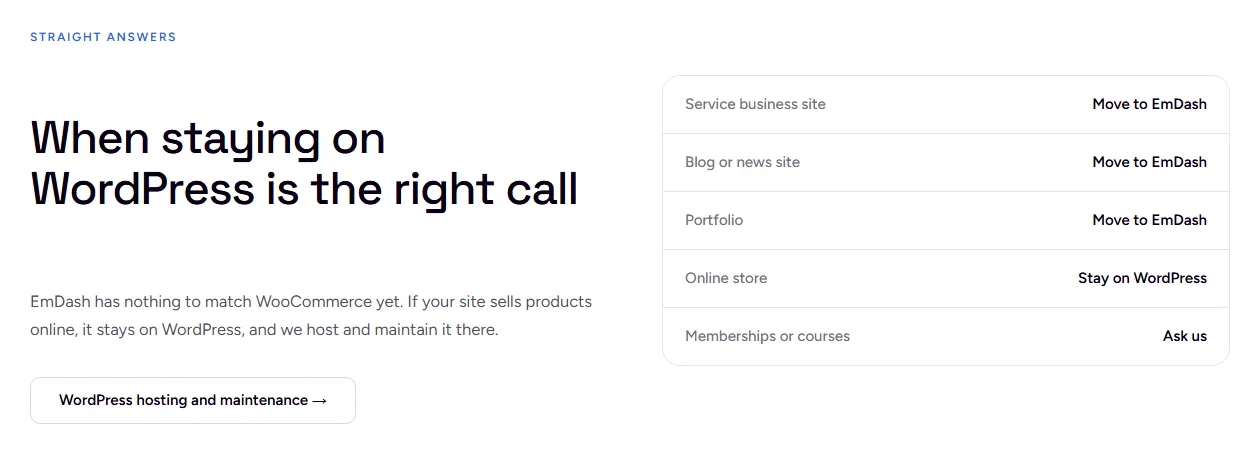
Stores are the clearest case. WooCommerce has handled products, stock, tax, shipping and checkout on WordPress for over a decade, and every store we build or host stays there.
That picture has started to change. When we searched EmDash's plugin registry on November 5, 2026, "ecommerce" returned 22 results from a handful of publishers, including full store systems and a Stripe checkout. Some are still marked beta. We haven't run a client store on any of them, and a checkout is the last place to be someone's early user. Our advice is to keep the store on WordPress and look again once one of these has a year of real orders behind it.
Sites with member logins, courses or paid content
EmDash has user accounts, but they're designed for the people who run the site: editors and admins signing in with a passkey or a Google or Microsoft login. A members area where customers pay, sign in and see lessons nobody else can is a different job. The same registry search turned up nothing for "course" or "forum".
A small gated area can be built into an EmDash site. A course with progress tracking, quizzes and recurring billing would mean building what a WordPress plugin already does, and that rarely pays off for a small business. If your site does this, stay.
Sites that depend on one particular plugin
Some WordPress sites are really one plugin with pages around it: a booking calendar, a business directory, a job board, an event ticket system. If that plugin is why customers visit, check it before anything else.
- Write down what a customer does with it, step by step, from the first click to the confirmation email.
- Search the EmDash registry for the same job. Events plugins exist; appointment booking, at our last check, didn't.
- If it's a premium plugin you pay for, expect to wait: the registry lists free plugins only for now.
- Ask whether a hosted tool would do the job instead. A booking link to a scheduling service often works as well as a plugin and moves with the site.
If none of those leaves a clear answer, the plugin decides it. Stay until it has an equivalent.
Teams who rebuild their own pages every week
Our EmDash builds give editors fixed sections to fill: change the headline, swap the photo, add a paragraph. Most owners prefer that, because nothing breaks when they change a sentence. But if three people on your team rearrange layouts in Elementor or Divi every week and that's how your marketing runs, they'd be giving up something they use. Ask the people who actually edit the site before you decide. Our EmDash and WordPress comparison covers the editing difference in more detail.
Sites with a WordPress developer you want to keep
An EmDash site's templates are written in Astro and TypeScript, not PHP. If someone has looked after your WordPress site for years and you trust them, ask whether they work in Astro. Far fewer developers do than know WordPress, so a move could mean changing who you call.
Sites heading into their busiest season
Even a clean move changes a lot at once: new templates, new forms, every address checked. Search Console can take a few weeks to settle afterwards. Don't schedule a switch in the month before your peak. If most of your enquiries arrive in spring, move in the autumn or wait until summer.
Worries that shouldn't stop a move
Owners raise these often, and none of them is a reason to stay on its own:
- Losing your Google rankings. Google ranks pages by their address, so the job is keeping every URL or redirecting it, then testing each one before the domain switches. Our post on what happens to your rankings in a move goes through it.
- Custom fields. EmDash's standard import leaves them behind, but they can be carried across. We scripted 11 of them across for 16 portfolio projects on our own move.
- A site in more than one language. EmDash has stored translations since 1.0, each language as its own version of a page. Plugins like WPML don't carry over, so plan to map each translation across.
- Hundreds of blog posts. Posts, categories and images import in bulk. What takes time is checking them afterwards, and that's work for the person doing the move.
A quick test
Answer three questions about your site:
- Does it take money for anything?
- Do customers log in to it?
- Would customers notice if one particular plugin disappeared?
Three noes and the site is a good fit for EmDash. Our migration checklist is the next step, or see how we move a WordPress site to EmDash for free. One yes means look harder at that section above. Two or more and we'd usually leave it on WordPress.
If you stay on WordPress
Staying is a fine answer. A WordPress site that's updated every week, checked after each update and backed up offsite runs well for years. We do that for the sites that belong there, stores included, with our WordPress hosting and maintenance for sites that stay.
Not sure which side yours is on? Send us the address and we'll tell you, and we'll say so if staying put is the better call.
Frequently asked questions
Should I switch from WordPress to EmDash?
For a plumber's, a photographer's or a consultant's site with no payments and no member logins, it's usually worth it: fewer parts to update and plugins that can't reach the rest of the site. A site that sells products or is built around one plugin is better off staying on WordPress for now.
Does EmDash have an online store yet?
Store plugins have started to appear in EmDash's plugin registry, some still in beta. None has WooCommerce's track record yet, so we keep every store we build on WordPress.
If I stay on WordPress now, can I move later?
Yes. Nothing about staying makes a later move harder. When the plugin you depend on has an EmDash equivalent, the move costs nothing on any of our monthly plans.